Keep your flights in view.
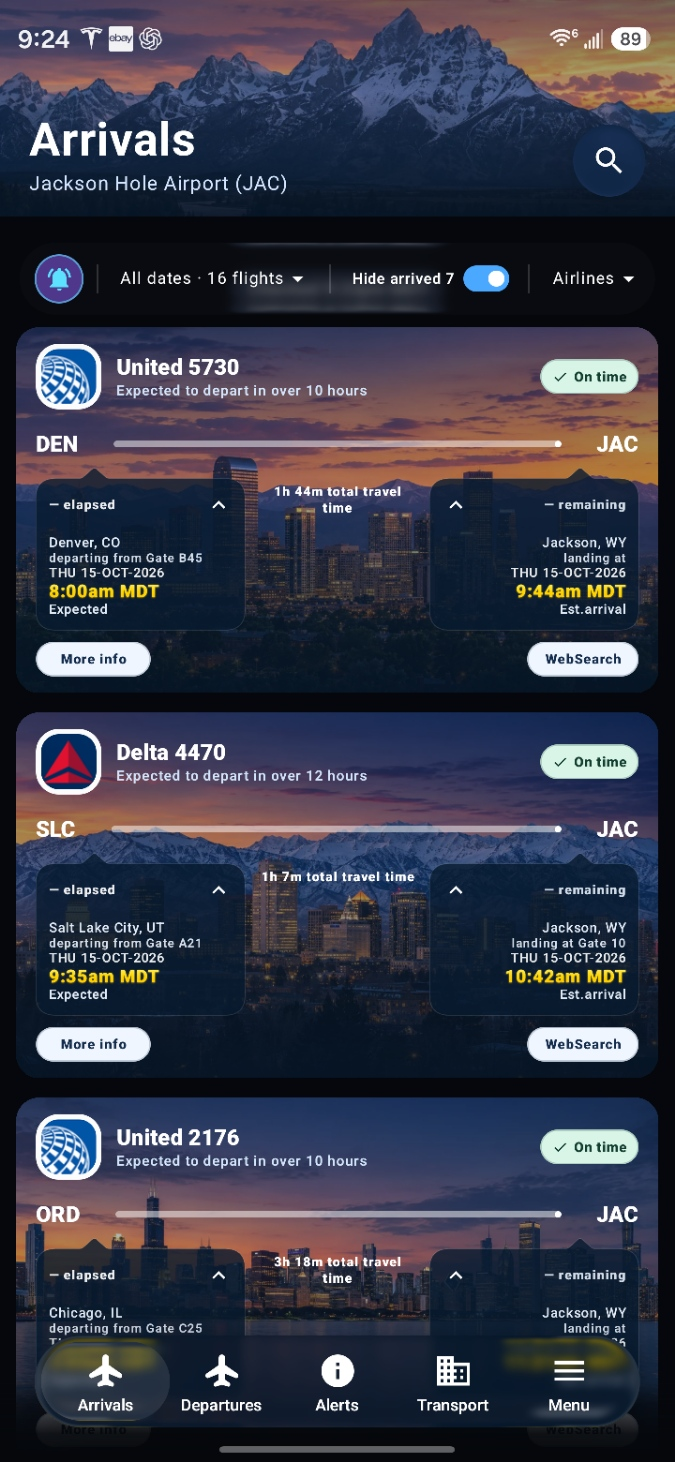
Browse Jackson Hole Airport arrivals and departures. Open a flight for details from your selected source.
Meet the data sources AirTrackerBETA
An independent Android app
Check Jackson Hole Airport arrivals and departures, save your notes, and set reminders.
An independent Android app for Jackson Hole flights.
Not affiliated with Jackson Hole Airport.
INSIDE AIRTRACKER
Inside AirTracker
One Android app for flight information, personal notes, and the small things you want to remember.
Browse Jackson Hole Airport arrivals and departures. Open a flight for details from your selected source.
Meet the data sourcesChoose fonts and colors, organize folders, and add photos, files, or voice recordings. Saved notes keep your styling.
Set reminders for your notes and use supported flight alerts to stay informed.
Notes & flight alertsSign in with Google or email. Adding a phone number is optional during Google profile setup.
Your account & privacyA quick guide
The arrivals and departures boards have a few handy controls. Here’s what they do.
About the flight dataSelect an available date, or keep All dates. The Airlines menu puts your chosen airline first while keeping the other flights below.
Dates & airline orderTurn on Hide arrived or Hide departed to clear completed flights from the list. Turn it off to bring them back.
You control the listRead the route, times, and status on the card. When available, More info opens extra details and WebSearch helps you look up the flight.
Details depend on the sourceFresh in AirTracker
In this update
Your profile has a new background and Liquid Glass buttons. Software Update has the same buttons too.
Sign in with Google or email. Phone numbers are optional with Google. Easier password reset and quick access to sign-up.
Your profile has a new background and Liquid Glass controls. Menus are smoother, editing is easier, and we’ve fixed some bugs.
Note cards keep your chosen fonts and text colors, with a subtle tint matching the note’s page color. Small improvements to note styling.
Refreshed design with Liquid Glass buttons and clearer icons for Software information and Last update.
Flight information & sources
Flight boards draw on the airport’s public flight pages. Extra flight details may come from FlightAware or Flightradar24 when available.
Arrivals and departures from the airport’s public flight pages. Visit the official website for airport services and travel information.
Official airport website ADDITIONAL FLIGHT DETAILSFlight status and tracking details when this source is selected and information is available.
Explore FlightAware 24OPTIONAL FLIGHT DETAILSOptional tracking and extra flight information when your selected source has details available.
Explore Flightradar24An independent beta app. AirTracker is a beta project with no affiliation or endorsement from Jackson Hole Airport, any airline, or the listed providers. Information and alerts may be delayed or unavailable; confirm travel changes directly with your airline or the airport.
Other app views may use ADSB.lol, ADSB.fi, and OpenSky for aircraft positions, and Open-Meteo for weather.
Before you get started
More about the app, your information, and getting AirTracker onto your phone.
Read our privacy policyDownload the APK on your Android device, then open the file to install. If Android asks, allow installation from the browser you used. Already have AirTracker? Open Settings → Software Update in the app to check for updates.
You can also find the APK and release details on our public GitHub release page.
The current APK supports Android 8.0 or later on 64-bit ARM devices. Some visual effects vary with your Android version and device capabilities.
No. AirTracker is independently developed and is not affiliated with, endorsed by, or operated by Jackson Hole Airport or any airline. For official airport information, visit jacksonholeairport.com.
Online note synchronization is on by default and can be turned off in Notes settings. Google sign-in provides your name, email, and profile picture. AI-assisted features can process note content through the app’s providers. The privacy policy explains the details and your choices.
The airport board and your selected detail provider may have different information. Extra details only appear when the source supplies them, and updates can be delayed. Confirm important changes with the airline or airport.
Yes. Open Notes settings to turn off online synchronization. It is on by default for supported signed-in content. Turning it off does not remove notes already stored in the cloud. See the privacy choices for more details.
Yes. AirTracker is a personal project being tested and improved. Features and availability can change. Some features require an internet connection, an account, or Android permissions.
To share feedback, use Feedback on the home page, or open Settings → Feedback → Send in the Android app. Feedback is available without signing in.